
An AI model on one graphics card: invoices on your own server, up to three times faster
August brought two open models that change the maths for companies protective of their documents: Meta's Muse Glimmer‑30B and the Qwen team's Qwen3.8‑27B, both under Apache 2.0. An invoice can be read on a server in your own building instead of being sent to an outside API. Below are four short listings: serving the model, extraction with a totals check, serving with the drafter, and measuring the speedup.
Two models, one licence
Meta released Muse Glimmer on 10 August. It is a dense model of about 29.6 billion parameters, roughly 1.8 billion of them a vision encoder, so it reads scans too. The context window exceeds 131,000 tokens. The model card reports 76.0 on SWE‑Bench Verified and 83.5 on GPQA Diamond. The same month brought Qwen3.8‑27B: dense, 27 billion parameters, 262,144 tokens of context, 89.2 on GPQA Diamond and 61.7 on SWE-bench Pro.
Do not compare 76.0 with 61.7. SWE-bench Verified and SWE-bench Pro are different task sets. On SWE-bench Pro, Glimmer's card gives 51.2, but Qwen scored its model on a version of the set with corrected tasks, so even that pair is not a clean comparison. According to its card, Glimmer's GPQA score comes from an Artificial Analysis run, not the same setup as Qwen's. Both models need testing on your own documents, and the listings below work with either once you change the model name.
Apache 2.0 allows commercial use, modification and running on your own hardware with no licence fees. The one condition: when you redistribute, you keep the licence text and the attribution notices. Record the licence with the download date and pin a specific repository revision, because a different set of weights can appear under the same name. Every revision in the listings below is pinned to a commit hash.
How much memory you really need
Meta says that quantised to roughly 4 bits the language model alone takes under 20 GB, and together with the vision encoder and working memory it fits a 24 or 32 GB budget. In vLLM the number looks different. The 4‑bit NVFP4 build used by the official vLLM recipe weighs 25.42 GB, because the embeddings, the output layer and the whole vision encoder stay at full precision. On an RTX 5090 the recipe measured 28.8 GB used out of 32.6 GB at a 131,072‑token context, and 68.8 tokens per second. NVFP4 kernels run only on Blackwell-generation cards.
The practical requirement is therefore one card with 32 GB of memory, such as the RTX 5090, which launched at a suggested price of $1,999. The smaller figure in Meta's announcement refers to its own K‑Quant quantisations, not to the vLLM build. Meta ran its speed tests on K‑Quant‑17GB, and on the RTX 5090 in llama.cpp.
Bash
pip install "vllm==0.28.0"
vllm serve Inferact/Muse-Glimmer-30B-NVFP4-W4A4 \
  --revision d35cb79050f419c457611b1cee5c5d15b176f285 \
  --tokenizer-revision d35cb79050f419c457611b1cee5c5d15b176f285 \
  --served-model-name muse-glimmer \
  --max-model-len 131072 \
  --enable-auto-tool-choice --tool-call-parser muse_glimmer \
  --reasoning-parser muse_glimmer \
--generation-config autoInvoice to JSON, with a totals check
The server speaks the OpenAI protocol, so the client is the ordinary openai SDK pointed at localhost. A pydantic class describes the invoice: seller NIP (the Polish tax number), invoice number, issue date, net, VAT, gross and line items. Amounts are Decimal so the comparison is exact to the grosz, with no floating-point rounding.
Python
import re, sys
from datetime import date
from decimal import Decimal
from openai import OpenAI
from pydantic import BaseModel, ValidationError

class Line(BaseModel):
    description: str
    quantity: Decimal
    net: Decimal

class Invoice(BaseModel):
    seller_nip: str
    number: str
    issue_date: date
    net: Decimal
    vat: Decimal
    gross: Decimal
    lines: list[Line]

INVOICE = """FAKTURA VAT nr FV/2026/08/117, data wystawienia 28.08.2026
Sprzedawca: Przykładowa Firma sp. z o.o., NIP 123-456-00-20
1. Wdrożenie modułu, 1 szt., netto 4 000,00 zł, VAT 23%
2. Licencja roczna, 2 szt., netto 900,00 zł, VAT 23%
Razem netto 4 900,00 zł, VAT 1 127,00 zł, brutto 6 027,00 zł"""
client = OpenAI(base_url="http://localhost:8000/v1", api_key="local")
reply = client.chat.completions.create(
    model="muse-glimmer",
    messages=[{"role": "system", "content": "Reasoning strength: low"},
              {"role": "user", "content": "Return this invoice as JSON only:\n" + INVOICE}],
    response_format={"type": "json_schema", "json_schema": {
        "name": "invoice", "schema": Invoice.model_json_schema()}},
    temperature=1.0, top_p=0.95, extra_body={"top_k": 64}, max_tokens=4000)

text = reply.choices[0].message.content or ""
found = re.search(r"\{.*\}", text, re.DOTALL)  # tolerate prose or a code fence around it
try:
    invoice = Invoice.model_validate_json(found.group(0) if found else "")
except ValidationError as err:
    sys.exit(f"Reply is not a valid invoice:\n{err}")
cents = Decimal("0.01")
if (invoice.net + invoice.vat).quantize(cents) != invoice.gross.quantize(cents):
    sys.exit(f"Totals do not add up: {invoice.net} + {invoice.vat} != {invoice.gross}")
print(invoice.model_dump_json(indent=2))The script sends response_format with the schema but does not trust it. In vLLM 0.28.0 with the muse_glimmer reasoning parser the schema is skipped without any warning: the request succeeds, but the model answers in free text that ignores the schema. Issue 52594 has described this since 17 August and was still open at the time of writing. So the script pulls the JSON object out of the reply itself, validates it against the schema and checks net plus VAT against gross. Anything that fails goes to a person, not to accounting.
The sampling parameters come from the vLLM recipe: temperature 1.0, top_p 0.95, top_k 64. The recipe advises against greedy decoding for this model and notes that even at temperature 0 identical requests returned different lengths. Cheap next checks are the NIP checksum and whether the line items add up to the net amount.
The drafter: the same model, faster
Speculative decoding adds a small helper model, the drafter. The drafter proposes the next few tokens, and the large model checks them all in one pass and keeps the ones it would have produced itself. DFlash, published in February by Chen, Liang and Liu, proposes a whole block of tokens in a single pass using block diffusion. The authors report more than sixfold lossless acceleration, and vLLM has supported DFlash since version 0.20.0.
Glimmer ships its own DFlash drafter, meta-models/Muse‑Glimmer‑30B‑assistant, at 5.11 GB. It predicts blocks of 16 tokens, so the number of speculative tokens is fixed at 15. With greedy decoding the output is, in principle, identical token for token. With sampling the drafter preserves the model's probability distribution, so quality is the same, although two runs will not produce the same characters.
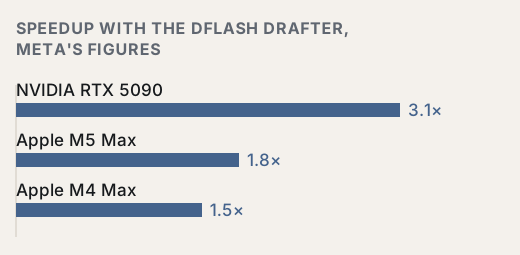
In vLLM the drafter does not fit next to the model on a single 32 GB card: the vLLM recipe records running out of memory at startup. On two RTX 5090 cards the same recipe measured a rise from 68.8 to about 240 tokens per second. Note that this compares one card with two, not just the effect of the drafter.
Bash
# Two 32 GB cards: the 5.11 GB drafter does not fit next to the model on one
vllm serve Inferact/Muse-Glimmer-30B-NVFP4-W4A4 \
  --revision d35cb79050f419c457611b1cee5c5d15b176f285 \
  --tokenizer-revision d35cb79050f419c457611b1cee5c5d15b176f285 \
  --served-model-name muse-glimmer \
  --tensor-parallel-size 2 \
  --max-model-len 131072 --max-num-seqs 32 \
  --enable-auto-tool-choice --tool-call-parser muse_glimmer \
  --reasoning-parser muse_glimmer \
  --generation-config auto \
  --speculative-config '{"method": "dflash",
    "model": "meta-models/Muse-Glimmer-30B-assistant",
    "revision": "e8192f3a8f617f74be2ce220360c89ef4789f39f",
"num_speculative_tokens": 15}'When the speedup stops helping
The drafter uses compute the card leaves idle when it serves one request and mostly waits on memory. With many concurrent requests that spare compute shrinks. In the DFlash paper, on Qwen3‑8B and HumanEval tasks, the speedup falls from 4.2 times with one request to 2.4 times with 32 concurrent ones. Headline numbers are almost always for a single request: LMSYS reports more than 4.3 times the throughput for a large Qwen 3.5 model at exactly that setting.
- The kind of text matters. In the same paper the drafter lands 8.01 tokens at a time on average on maths tasks and 6.50 on code. Your invoices will give a different number.
- The drafter takes memory that would otherwise go to the context cache, which sets how many requests you can serve at once.
- Meta's figures describe a single stream on a developer's machine. A server handling a whole department is a different load profile.
Python
import asyncio, time
from openai import AsyncOpenAI

client = AsyncOpenAI(base_url="http://localhost:8000/v1", api_key="local")
PROMPTS = [f"Opisz krok {i} zamknięcia miesiąca w małej firmie." for i in range(1, 17)]

async def ask(prompt: str, gate: asyncio.Semaphore) -> int:
    async with gate:
        reply = await client.chat.completions.create(
            model="muse-glimmer", messages=[{"role": "user", "content": prompt}],
            max_tokens=512, temperature=1.0, top_p=0.95, extra_body={"top_k": 64})
        return reply.usage.completion_tokens

async def main() -> None:
    await ask("Rozgrzewka.", asyncio.Semaphore(1))  # first request warms up the server
    for concurrency in (1, 8):
        gate = asyncio.Semaphore(concurrency)
        start = time.perf_counter()
        tokens = sum(await asyncio.gather(*(ask(p, gate) for p in PROMPTS)))
        print(f"concurrency {concurrency}: {tokens / (time.perf_counter() - start):.1f} tok/s")

asyncio.run(main())A measurement plan for your hardware
Five steps before you decide
- 01Baseline: the server from listing 1, run listing 4, record tokens per second at 1 and 8 concurrent requests.
- 02A fair comparison: if the drafter needs a second card, also measure the model without the drafter on two cards, with --tensor-parallel-size 2. Otherwise you are measuring the second card, not the drafter.
- 03With the drafter: the server from listing 3, the same script. Divide by the baseline separately for 1 and for 8 requests. Put excerpts from your own documents in PROMPTS, because the drafter's hit rate depends on the text.
- 04Quality: run 50 to 100 real invoices through listing 2 with and without the drafter. The number rejected by the totals check should match within random variation.
- 05Decision: for a queue of documents processed one after another, the drafter usually pays off. If the gain at 8 requests is small and the number of users is growing, give that memory to serving more requests instead.
Sources
- 01Meta AI Research, Introducing Muse Glimmerpublished 10 August 2026
- 02Hugging Face, model card meta-models/Muse‑Glimmer‑30Bpublished 10 August 2026
- 03Hugging Face, Meta is back with Muse Glimmerpublished 10 August 2026
- 04Hugging Face, model card Qwen/Qwen3.8‑27Blast updated 14 August 2026
- 05vLLM recipes, Muse‑Glimmer‑30Brevision of 31 August 2026
- 06vLLM, release v0.28.0published 26 August 2026
- 07vLLM issue 52594, muse_glimmer cannot combine reasoning with structured outputsopened 17 August 2026
- 08Chen, Liang, Liu, DFlash: Block Diffusion for Flash Speculative Decodingv1 5 February 2026, v2 28 May 2026
- 09vLLM Blog, Speculators v0.5.0: DFlash Support and Online Trainingpublished 28 May 2026
- 10LMSYS, The next generation of speculative decoding: DFlash and Spec V2published 15 June 2026
- 11NVIDIA, GeForce RTX 50 Series announcementpublished 6 January 2025